Version 1.2.0
Find it faster.
Track it clearer.
This update brings a quicker way to search the map, one merged view for history and trips, and sharper detail across Maintenance and Driver Score — built from the feedback you sent us.
2 new features · 16 enhancements · 2 fixes
New Features
Driver Score on Device Overview
The Driver Score metric now sits directly in the Device Overview section, so driver performance is visible without leaving the screen.

Merged History & Trips View
History and Trips are now one unified screen, cutting a navigation step out of everyday tracking.
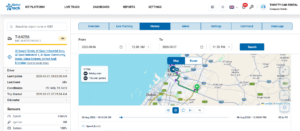
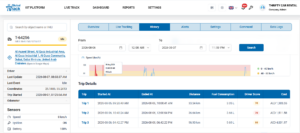 In Image 1, the History tab shows the selected trip’s route on the map with driving-start and trip-end markers, along with playback controls to replay the journey. In Image 2, scrolling down reveals a speed-over-time chart and a Trip Details table listing Started At, Ended At, Distance, Fuel Consumption, Driver Score, and Cost for each trip within the selected date range.
Enhancements
Clickable Map Coordinates
Address and coordinate values on the map are now links that open the exact location in Google Maps.
Map Search Bar
A new search bar on the Map view makes finding a specific object quicker.
Smarter Sensor Display for GT06 Devices
Sensor fields hide automatically on GT06 devices when there’s no data, rather than showing “N/A.”
Refreshed Overview Screen Typography
Font styling on the Overview screen updated for better visual consistency.
Bulk Fuel Price Updates
Update the fuel price across every applicable record in one action, instead of one by one.
Color-Coded Route History
Each completed trip in a vehicle’s route history now shows in its own color, so trips are easier to tell apart at a glance.
Renamed “Device” Column to “Object Name”
The Maintenance module’s “Device” column is now “Object Name,” matching naming used across the platform.
Improved Maintenance Pop-up Layout
Fixed the misaligned layout in the Add Maintenance pop-up on the Scheduled Maintenance screen.
Redesigned “Rows Per Page” Control
The Rows Per Page selector has a cleaner, more intuitive design.
Better Row Spacing in Sensors Section
Adjusted row spacing in the Overview screen’s Sensors section for easier reading.
Updated Reference Number Field
The Reference Number field in the Objects table has been updated.
New Dark Mode Icon
The Dark Mode icon has a new design for better visibility and consistency with the overall UI.
Total Cost Column in Maintenance
A new “Total Cost” column in the Maintenance module shows expenses per object at a glance.
Improved Text Readability in Maintenance View
Updated text color in the Maintenance view option for better readability.
Repositioned Notifications
Notification pop-ups moved for better visibility and to avoid overlapping other UI elements.
Updated Live Map Pop-up Details
Refined the details shown in the pop-up that appears when an object is clicked on the Live Map.
Bug Fixes
Immobilizer Status Display Fixed
Resolved an issue where the Immobilizer status wasn’t displaying correctly on screen.
Route Line Jitter Fixed
Fixed a visual glitch where the route line would jitter during zoom in and out on the History screen.
Coming Next
We’re already scoping the next round of improvements based on your feedback — details to follow as they’re finalized.
Thank you for your continued feedback — it directly shapes improvements like these.
|
Questions or feedback? Reach out to your Parallax support contact. |


